
Master Services Agreement
Thank you for trusting Andy Espo d/b/a Call Andy! Macintosh Consulting (“Call Andy,” “we,” “us,” or “our”) to provide you with professional information technology services. This Master Services Agreement (MSA) (this “Agreement”) governs our business relationship with you, so please read this document carefully and keep a copy for your records.
SCOPE
a. Context. In this Agreement, references to “Client,” “you,” or “your” mean the entity who has accepted a quote, proposal, service order, statement of work, or similar document (electronic or otherwise) from Call Andy. (In this Agreement we refer collectively to these type of documents as a “Quote,” although the actual title or caption of the service-related documents might vary.) If we have an ongoing business relationship with you, then “Quote” will also include any confirmatory communications, such as those sent by us to you by email or text, in which we describe or summarize services or products that we are providing or facilitating for you, or products or services that you have ordered or purchased from us.
This document contains an arbitration provision that requires, under most circumstances, disputes to be settled by arbitration and not by a judge or jury. Please read the “Arbitration” section of this Agreement carefully. This document also contains important provisions regarding your payment obligations, automatic renewal of ongoing services, limitations of liability, and other significant matters; please read this document and consider those issues carefully before accepting a Quote.
This document limits or, in some cases, eliminates the liability of Call Andy for services that it does not provide directly to you and/or which are provided to you by third parties (defined as “Third-Party Services” and “Third-Party Providers,” below). Please read this document and consider such limitations carefully before accepting a Quote.
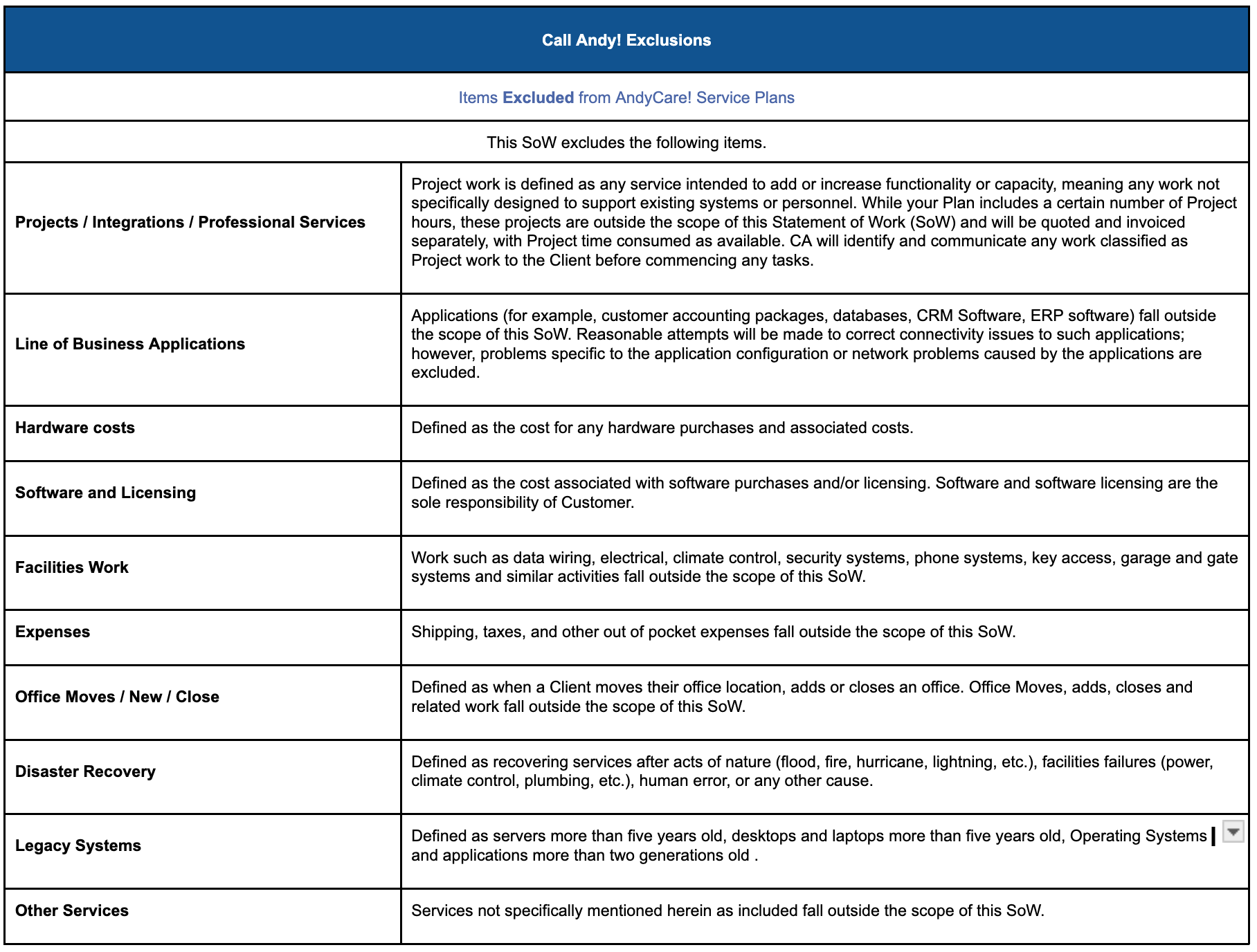
b. Applicability. The scope of our services will be as described in a Quote and/or as requested by you and agreed by us, whether in writing or not, from time to time (collectively, “Services”). All other services, projects, and related matters are out-of-scope and will not be provided to you unless we expressly agree to do so (collectively, “Out of Scope Services”). Please read both the Quote and this Agreement before accepting the Quote. If you have any questions about either of those documents or this Agreement, please do not sign the Quote and, instead, contact us for more information.
c. Version. Each Quote will be governed under the version of this Agreement in place on the date that you accept the Quote. We may change this Agreement from time to time, and modified versions of this Agreement will apply to Quotes that you accept after the date of such modifications. You can determine the version of this Agreement by noting the “last updated” date indicated at the bottom of this document. We advise you to keep a copy of this document and keep track of the date indicated below when you accept a Quote.
d. Conflicts. The provisions of a Quote govern over conflicting or materially different terms contained in this Agreement, which allows us to craft solutions to meet your needs by making applicable changes in the Quote.
e. Third-Party Providers/Services. Some services may be provided to you directly by our personnel, such as situations in which our personnel install software agents on managed devices or physically install equipment at your premises. These services are distinguishable from services that are provided to you or us by third-party providers, who are often referred to in the industry as “upstream providers.” (In this Agreement, we call upstream providers “Third-Party Providers” and the services that Third-Party Providers provide are called “Third-Party Services”). By way of example, Third-Party Services may include help desk services, malware detection and remediation services, firewall and endpoint security-related services, backup and disaster recovery solutions, and the provision of software used to monitor the managed part of your network, among others.
Selection. As your managed information technology provider, we will select the Third-Party Providers that provide services appropriate for your managed information technology environment (the “Environment”) and facilitate the provision of those Third-Party Services to you. Not all Third-Party Services will be expressly identified as being provided by a Third-Party Provider. We reserve the right to change Third-Party Providers in our sole discretion as long as the change does not materially diminish the Services we are obligated to provide or facilitate under a Quote.
Reseller. We are resellers and/or facilitators of the Third-Party Services and do not provide those services to you directly. For this reason, we are not and cannot be responsible for any defect, act, omission, or failure of any Third-Party Service or any failure of any Third-Party Provider. Third-Party Services are provided on an “as is” basis only. If an issue requiring remediation arises with a Third-Party Service, then we will endeavor to provide a reasonable workaround or, if available, a “temporary fix” for the situation; however, we do not warrant or guarantee that any particular workaround or fix will be available or achieve any particular result, or that Third-Party Services will run in an uninterrupted or error-free manner.
IMPLEMENTATION
a. Advice; Instructions. We may offer you specific advice and directions related to the Services (“Advice”). For example, our Advice may include increasing server or hard drive capacity, increasing CPU power, replacing obsolete equipment, or requesting that you refrain from engaging in acts that disrupt the Environment or that make the Environment less secure. You are strongly advised to promptly follow our Advice which, depending on the situation, may require you to make additional purchases or investments in the Environment at your sole cost. We are not responsible for any problems or issues, including but not limited to downtime or security-related issues, caused by or related to your failure to follow our Advice promptly. If, in our reasonable discretion, your failure to follow our Advice makes part or all the Services economically or technically unreasonable or impracticable to provide or facilitate, then we may provide you with no less than ten (10) days to remediate the issue(s). If the issues continue to exist after this ten (10) day period, then we may, at our discretion terminate the applicable Services For Cause (explained below) by providing notice of termination to you or, alternatively, we may adjust the scope of the Quote to exclude any impacted or affected portion of the Environment. Unless specifically and expressly stated in writing by us (such as in a Quote), any services required to remediate issues caused by your failure to follow our Advice, or your unauthorized modification of the Environment, as well as any services required to bring the Environment up to or maintain the Minimum Requirements (defined below), are out-of-scope.
Co-Management. Co-Managed situations occur when we are providing the Services alongside another IT vendor, IT manager/department, or a third-party solution provider that is providing different, complementary, or overlapping services (“Co-Managed Situations”). An internal IT Department would be an example of a co-managed provider, and in this Agreement we refer to such other vendors, managers/departments, and third-party providers as “Co-Managed Providers”.
In Co-Managed Situations where our Services conflict with the services provided or facilitated by a Co-Managed Provider, we will endeavor to implement our Services in an efficient and effective manner; however, we will not be responsible for any delay or inability to provide or facilitate the Services due to a Co-Managed Provider’s omissions or activities. If a Co-Managed Provider’s actions conflict with our Services or undermine the integrity or effectiveness of our Services, we attempt to reconcile the issue(s) with the Co-Managed Provider. If reconciliation is not achieved and/or cannot be agreed upon, then we will yield to the Co-Managed Provider’s determination and bring that situation to your attention. In Co-Managed Situations, Client hereby agrees to indemnify and hold us harmless from and against any and all Environment-related issues, errors, downtime, exploitations, and/or vulnerabilities (collectively, “Environment Issues”), as well as any damages, expenses, costs, fees, charges, occurrences, obligations, claims, and causes of action arising from Environment Issues, where the Environment Issues cannot directly and unambiguously be traced back to any wrongdoing by Call Andy.
2. If the termination, suspension, or reduction of a Co-Managed Provider’s services results in an immediate and urgent need for replacement services (i.e., mission-critical substitute services for those that were impacted by the Co-Managed Provider’s absence, "Additional Services"), we may provide you with written notice of our intent to undertake the Additional Services, which notice will include a fee estimate and starting date that will not be earlier than 5 days after delivery of the notice. If you do not object to our proposed Additional Services, then the Additional Services will go into effect as of the date indicated in the notice, and your monthly invoices will be adjusted as stated in the notice. Additional Services will run coterminous with the Services; however, you may terminate the Additional Services at any time by providing us with thirty (30) days advance written notice of termination.
2. Prioritization. All Services will be implemented and/or facilitated (as applicable) in a scheduled and prioritized manner as we determine reasonable and necessary. Exact commencement or start dates may vary or deviate from the dates we state to you depending on the Services being provided and the extent to which prerequisites (if any), such as transition or onboarding activities, must be completed.
3. Modifications. To avoid a delay or negative impact on the Services, we strongly recommend that you refrain from modifying or moving the Environment, or installing software in the Environment, unless we expressly authorize such activity. In all situations (including those in which we are co-managing an Environment with your Co-Managed Provider as described above), we will not be responsible for changes to the Environment that are not authorized by us or any issues or errors that arise from those changes.
b. Third-Party Support. If, at our discretion, a hardware or software issue requires vendor or OEM support, we may contact the vendor or OEM (as applicable) on your behalf and invoice you for all fees and costs involved in that process (“OEM Fees”). If OEM Fees are anticipated in advance, we will endeavor to obtain your permission before incurring such expenses on your behalf unless exigent circumstances require us to act otherwise. We do not warrant or guarantee that the payment of OEM Fees will resolve any particular problem or issue, and it is understood that the resolution process can sometimes require the payment of OEM Fees to narrow (or potentially eliminate) potential issues.
c. Authorized Contact(s). We will be entitled to rely on any directions or consent provided by your personnel or representatives who you designate to provide such directions or consent (“Authorized Contacts”). If no Authorized Contact is identified in an applicable Quote or if a previously identified Authorized Contact is no longer available to us, then your Authorized Contact will be the person (i) who accepted the Quote, and/or (ii) who is generally designated by you during our relationship to provide us with direction or guidance. We will be entitled to rely upon directions and guidance from your Authorized Contact until we are affirmatively made aware of a change of status of the Authorized Contact. If your change is provided to us in writing (physical document or by email), then the change will be implemented within two (2) business days after the first business day on which we receive your change notice. If your change notice is provided to us in person or by telephone (live calls only), the change will be implemented on the same business day on which the conversation takes place. Do not use a ticketing system or help desk request to notify us about the change of an Authorized Contact; similarly, do not leave a recorded message informing us of a change to your Authorized Contact. We reserve the right but not the obligation to delay the Services until we can confirm the Authorized Contact’s authority within your organization.
d. Access. You hereby grant to us and our designated Third-Party Providers the right to monitor, diagnose, manipulate, communicate with, retrieve information from, and otherwise access the Environment solely as necessary to enable us or those providers, as applicable, to provide or facilitate the Services. Depending on the Service, we may be required to install one or more software agents into the Environment through which such access may be enabled. It is your responsibility to secure, at your own cost and prior to the commencement of any Services, any necessary rights of entry, licenses (including software licenses), permits or other permissions necessary for Call Andy or applicable Third-Party Providers to provide or facilitate the Services to you. Proper and safe environmental conditions must always be provided and assured by you. Call Andy shall not be required to engage in any activity or provide or facilitate any Services under conditions that pose or may pose a safety or health concern to any personnel, or that would require extraordinary or non-industry standard efforts to achieve.
e. Ongoing Requirements. Everything in the Environment must be genuine and licensed, including all hardware, software, etc. If we ask for proof of authenticity and/or licensing, you must provide us with such proof. If we require certain minimum hardware or software requirements (“Minimum Requirements”), you agree to implement and maintain those Minimum Requirements as an ongoing requirement of us providing the Services to you.
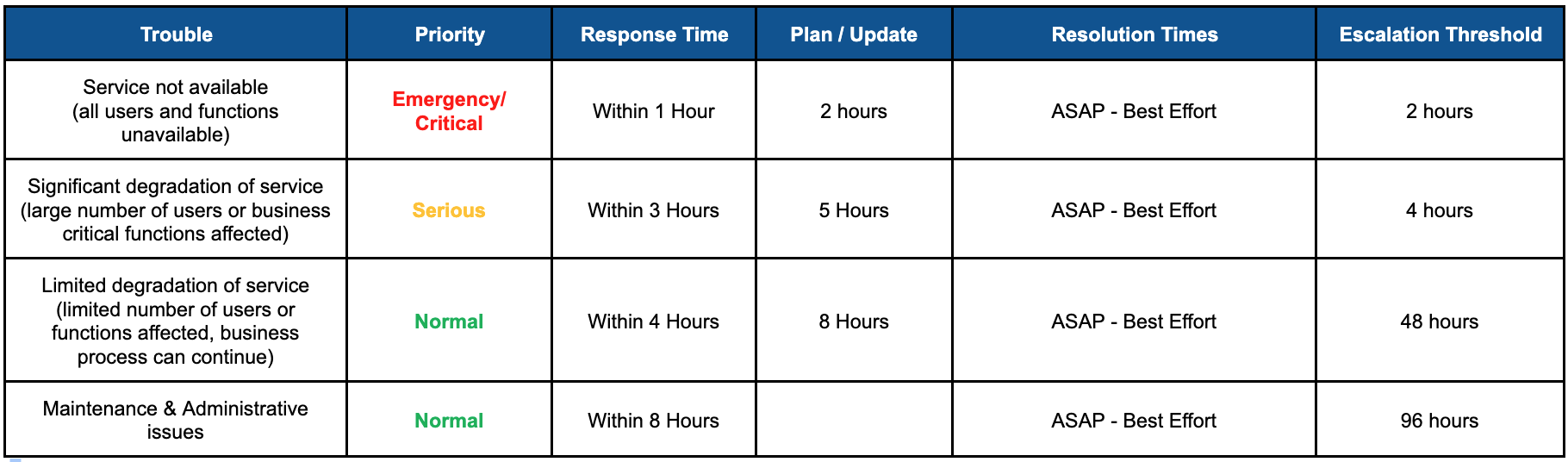
f. Response. Our response to issues relating to the Services will be handled in accordance with the provisions of the Quote. In no event will we be responsible for delays in our response or our provision of Services during (i) those periods of time covered under the Transition Exception (defined below), or (ii) periods of delay caused by Scheduled Down Time, Client-Side Downtime, Vendor-Side Downtime (all defined below). or (iii) periods in which we are required to suspend the Services to protect the security or integrity of the Environment or our equipment or network, or (iv) delays caused by a force majeure event.
Scheduled Downtime. For the purposes of this Agreement, Scheduled Downtime means the period of downtime during which we perform scheduled maintenance or adjustments to the Environment or to our network or systems. Scheduled Downtime will generally not occur Monday through Friday between the hours of 9:00 AM and 5:00 PM (local time in your jurisdiction) without your authorization or unless exigent circumstances require us to perform emergency maintenance or related activities. We will use our best efforts to provide you with at least twenty-four (24) hours of notice prior to Scheduled Downtime.
Client-Side Downtime. We will not be responsible under any circumstances for any delays or deficiencies in the provision of, or access to, the Services to the extent that such delays or deficiencies are caused by your actions or omissions, or by your Co-Managed Provider’s acts or omissions (“Client-Side Downtime”). Client-Side Downtime includes, but is not limited to, any period during which we require your participation, or we require information, directions, or authorization from you but cannot reach your Authorized Contact(s).
Vendor-Side Downtime. We will not be responsible under any circumstances for any delays or deficiencies in the provision of, or access to, the Services or any expenses or costs to the extent that such delays, deficiencies, costs, or expenses are caused by Third-Party Providers, third-party licensors, or “upstream” service or product vendors.
Transition Exception. You acknowledge and agree that for the first forty-five (45) days following the commencement date of any Service, as well as the entirety of any period during which we are performing off-boarding-related services (e.g., assisting you in the transition of the Services to another provider, terminating a service, etc.), any response time commitments previously provided to you will not apply to us, and it is understood that there may be unanticipated downtime or delays related to those activities (the “Transition Exception”).
FEES; PAYMENT
a. Fees. You agree to pay the fees, costs, and expenses charged by us for the Services in accordance with the amounts, methods, restrictions, and schedules described in each Quote (“Fees”).
In addition to the Fees, you are responsible for any miscellaneous costs and expenses (not to exceed $250/month without your prior consent) that we incur in providing or facilitating the Services to you (“Miscellaneous Expenses”). Miscellaneous Expenses will generally appear as a line-item entry on your invoice(s) and may include, for example, small device purchases such as delivery/postal/courier costs, data migration tools, and registration/service initiation fees charged by Third-Party Providers.
You are responsible for all freight, insurance, and taxes (including but not limited to import or export duties, sales, use, value add, and excise taxes). If you qualify for a tax exemption, you must provide us with a valid certificate of exemption or other appropriate proof of exemption.
We reserve the right to increase the fees, without prior notice to you and retroactively (if applicable), to accommodate increases in the number of authorized users, covered devices, and/or additional Client sites receiving the Services that are detected but were not previously billed to you by Call Andy.
b. Nonpayment. Fees that remain unpaid for more than thirty (30) days when due will be subject to interest on the unpaid amount(s) from the due date until and including the date payment is received, at the lower of either 1.5% per month or the maximum allowable rate of interest permitted by applicable law. We reserve the right, but not the obligation, to suspend part or all the Services without prior notice to you if any portion of undisputed fees are not timely paid. Monthly or recurring charges (if applicable) will continue to accrue during any period of suspension. Notice of disputes related to Fees must be received by us within sixty (60) days after the date on which an applicable invoice is delivered to you, otherwise you waive your right to dispute the Fee thereafter. We reserve the right to charge a reasonable reconnect fee (of no more than 10% of your monthly recurring fees or the actual amounts that Third-Party Providers charge to reconnect the services, whichever is greater) if we suspend the Services due to your nonpayment.
c. Minimum Monthly Fees. The initial Fees indicated in the Quote for recurring services are the minimum monthly fees (“MMF”) charged to you during the term. You agree that the amounts paid by you under the Quote will not drop below the MMF regardless of the number of users or devices to which the Services are directed or applied, unless we agree to the reduction.
d. Increases. We reserve the right to increase our monthly recurring fees by reflecting the increase on your monthly invoices; provided, however, if a single increase in a calendar year or all such increases, in the aggregate, in a calendar year is/are more than five percent (5%) of the fees charged for the same Services in the prior calendar year, then you will be provided with a sixty (60) day opportunity to terminate the Services by providing us with written notice of termination (“Termination Option Period”). If you timely terminate the Services during the Termination Option Period, you will be responsible for the payment of all fees that accrue up to the termination date and all pre-approved, non-mitigatable expenses that we incurred in our provision of the Services through the date of termination (such as “per seat licensing costs”, as discussed below). Your continued acceptance or use of the Services after the Termination Option Period will indicate your acceptance of the increased fees. Pass Through Increases (described below), as well as any fee increases due to the addition of managed devices, users, or Environment modification(s) are independent of any increases to our monthly recurring fees and will not be included in the five percent calculation described in this paragraph.
e. Pass Through Increases. We reserve the right to pass through to you any incremental increases in the costs and/or fees for Third-Party Services (“Pass Through Increases”). Since we do not control Third-Party Providers or Third-Party Services, we cannot predict whether such price increases will occur. Should they occur, we will endeavor to provide you with as much advance notice as reasonably possible.
f. Method of Payments. The fees listed in a Quote assume that all payments will be paid in cash by electronic transfer (i.e., ACH). If you desire to pay by credit card, then we reserve the right to charge a convenience fee equal to the actual costs we incur to accept your credit card (where allowed by law), which will not be more than four percent (4%) of the amount invoiced. When enrolled in an ACH payment processing method, you authorize us to electronically debit your designated checking or savings account for any payments due under the Quote. This authorization will continue until otherwise terminated in writing by you. We will apply a $20.00 service charge (or the maximum amount permitted by law, whichever is less) to your account for any electronic debit that is returned unpaid due to insufficient funds or due to your bank’s electronic draft restrictions.
g. Expenses. Any costs or expenses that we incur while providing the Services during a national, state, or local emergency or during a period in which there are fuel, manpower, or other national or local shortages (“State of Emergency”) will be invoiced and payable by you. By way of example, such expenses may include incremental increases in the cost of gasoline or electrical power, or the purchase of health or safety equipment reasonably necessary to provide or facilitate the Services to you.
LIMITED WARRANTIES; LIMITATIONS OF LIABILITY
a. Hardware / Software Purchases. All equipment, machines, hardware, software, peripherals, or accessories purchased through Call Andy (“Third-Party Products”) are generally nonrefundable once the item is ordered from Call Andy’s third-party provider or reseller. If you desire to return a Third-Party Product, then the third-party provider’s or reseller’s return policies will apply. We do not guarantee that Third-Party Products will be returnable, exchangeable, or that re-stocking fees can or will be avoided, and you agree to be responsible for paying all re-stocking or return-related fees charged by the third-party provider or reseller. We will use reasonable efforts to assign, transfer and facilitate all warranties (if any) and service level commitments (if any) for the Third-Party Products to you, but will have no liability whatsoever for the quality, functionality, or operability of any Third-Party Products, and we will not be held liable as an insurer or guarantor of the performance, uptime or usefulness of any Third-Party Products. You will be responsible for all fees and costs (if any) charged for warranty-related service. All Third-Party Products are provided “as is” and without any warranty whatsoever as between Call Andy and you (including but not limited to implied warranties).
b. Liability Limitations. This paragraph limits the liabilities arising from the Services and is a bargained-for and material part of our business relationship with you. You acknowledge and agree that Call Andy would not provide any Services, or enter into any Quote or this Agreement, unless Call Andy could rely on the limitations described in this paragraph. In no event will either party be liable for any indirect, special, exemplary, consequential, or punitive damages, such as lost revenue, loss of profits (except for fees due and owing to Call Andy), savings, or other indirect or contingent event-based economic loss arising out of or in connection with the Services, this Agreement, any Quote, or for any breach hereof or for any damages caused by any delay in furnishing Services under this Agreement or any Quote, even if a party has been advised of the possibility of such damages; however, amounts you owe us under this Agreement, reasonable attorneys’ fees awarded to a prevailing party (as described below), your indemnification obligations, and any amounts due and payable pursuant to the non-solicitation provision of this Agreement shall not be limited by the foregoing limitation. Except for the foregoing exceptions, a responsible party’s (“Responsible Party’s”) aggregate liability to the other party (“Aggrieved Party”) for damages from any and all claims or causes whatsoever, and regardless of the form of any such action(s), that arise from or relate to this Agreement (collectively, “Claims”), whether in contract, tort, indemnification, or negligence, shall be limited solely to the amount of the Aggrieved Party’s actual and direct damages, not to exceed the amount of fees paid by you (excluding hard costs for licenses, hardware, etc.) to Call Andy for the specific Service upon which the applicable claim(s) is/are based during the six (6) month period immediately prior to the date on which the cause of action accrued, or $10,000, or the amounts that are actually paid out under a Responsible Party’s insurance policy, whichever is greater. The parties agree that only one of the foregoing financial remedies may be selected by an Aggrieved Party and once selected, the selected remedy shall be the sole financial remedy available to the Aggrieved Party to the exclusion of all other remedies. The foregoing limitations shall apply even if the remedies listed in this Agreement fail of their essential purpose; however, the limitations shall not apply to the extent that such limitations are prohibited under applicable law, or to the extent that the Claims are caused by a Responsible Party’s willful or intentional misconduct, or gross negligence. Similarly, a Responsible Party’s liability obligation shall be reduced to the extent that a Claim is caused by, or the result of, the Aggrieved Party’s willful or intentional misconduct, gross negligence, or to the extent that the Aggrieved Party failed to reasonably mitigate (or attempt to mitigate, as applicable) the Claims. Under no circumstances shall Call Andy have any liability for any claims or causes of action arising from or related to Out of Scope Services.
c. Waiver of Liability for Admin/Root Access. We strongly advise you to refrain from providing administrative (or “root”) access to the Environment to any party other than Call Andy, as such access by any person other than a Call Andy employee could make the Environment susceptible to serious security and operational issues caused by, among other things, human error, hardware/software incompatibility, malware/virus attacks, and related occurrences.
If we do not have exclusive access to, or exclusive control over, the administrative areas of the Environment, then we will not be responsible for, and you agree to hold us harmless against, all Environment-related issues, downtime, exploitations, and/or vulnerabilities, as well as any damages, expenses, costs, fees, charges, occurrences, obligations, claims, and causes of action (collectively “Claims”) arising from or related to any activities that occur, may occur, or were likely to have occurred in or through the Environment at an administrative or root level, as well as any issues, downtime, exploitations, vulnerabilities, or Claims that can reasonably be traced back or connected to activities occurring at the administrative or root level (“Activities”) in the Environment provided, of course, that such Activities were not directly performed or authorized in writing by Call Andy. Call Andy’s business records shall be final and determinative proof of whether any Activities were performed or authorized in writing by Call Andy.
If we have exclusive control over the administrative areas of the Environment and, subsequently, you request or require us to provide any non-Call Andy personnel (i.e., non-Call Andy employees, Co-Managed Providers, etc.) with administrative or root access to any portion of the Environment, then you hereby agree to indemnify and hold us harmless from and against any and all Claims arising from Activities, provided that the Activities were not directly performed or authorized in writing by Call Andy. Call Andy’s business records shall be final and determinative proof of whether any Activities were performed or authorized in writing by Call Andy.
d. Waiver of Liability for Legacy Devices. As used herein, “Legacy Device” means a piece of equipment, device, hardware, or software that is outdated, obsolete, incompatible with industry-standards, and/or no longer supported by its original manufacturer. Legacy Devices may cause vulnerabilities in your network, or they may fail from time to time or cause other parts or processes of the Environment to operate improperly or (in some cases) fail. Neither we nor any Third-Party Provider will be responsible for the remediation of issues arising from or related to the existence or use of Legacy Devices in the Environment, and we and our Third-Party Providers will be held harmless from and against all issues, claims, and causes of action arising from or related to the existence or use of Legacy Devices in the Environment. Any advice, guidance, or service that we provide or facilitate for a Legacy Device is an accommodation, not a contractual obligation, and does not create any guarantee, warranty, or further or continuing duty by us to support, facilitate or provide services to such device(s). We will not be liable under any circumstances for any issues (including but not limited to downtime or vulnerabilities) that arise from or relate to Legacy Devices. We strongly advise you to review your company’s insurance policies to determine the extent to which the existence of Legacy Devices in the Environment would create an exclusion of insurance coverage in the event of a security-related incident.
INDEMNIFICATION
You agree to indemnify us and hold us harmless from and against all fees, costs, and expenses (including, without limitation, reasonable attorneys’ fees, expert witness costs, and discovery-related costs) that we incur as a result of (i) your failure to comply with any applicable law, rule, or regulation, or (ii) your failure to follow our service-related or license-related instructions, or (iii) being required to participate as a witness or a party in any legal action, arbitration, or mediation arising from your business disputes, internal or otherwise, or (iv) any third -party audits necessitated by your acts, omissions, or business-related needs. In addition, each party (an “Indemnifying Party”) agrees to indemnify, defend, and hold the other party (an “Indemnified Party”) harmless from and against all losses, damages, costs, expenses, or liabilities, including reasonable attorneys’ fees, (collectively, “Damages”) that arise from, or are related to, the Indemnifying Party’s breach of this Agreement. The Indemnified Party will have the right, but not the obligation, to control the intake, defense and disposition of any claim or cause of action for which indemnity may be sought under this section. The Indemnifying Party shall be permitted to have counsel of its choosing participate in the defense of the applicable claim(s); however, (i) such counsel shall be retained at the Indemnifying Party’s sole cost, and (ii) the Indemnified Party’s counsel shall be the ultimate determiner of the strategy and defense of the claim(s) for which indemnity is provided. No claim for which indemnity is sought by an Indemnified Party will be settled without the Indemnifying Party’s prior written consent, which shall not be unreasonably delayed or withheld.
TERM; TERMINATION
Please note: This section contains important provisions relating to the automatic renewal of managed services; please review this section, as well as the terms of your Quote, carefully. There are several dates of which you should be aware, including the effective/termination dates of this Agreement and the effective/termination dates of the Services under a Quote. Each Quote will have its own term and will be terminated only as provided in this Agreement or as provided in the Quote.
a. This Agreement. This Agreement applies to all Services and is effective as of the date on which we provide or facilitate a Service to you or on the date on which you accept a Quote, whichever is earlier (“Effective Date”). This Agreement will terminate automatically (i) if you or we terminate this Agreement For Cause (described below), or (ii) immediately after the last date on which we have provided the Services to you or facilitated the Services for you (as applicable). Upon the termination of this Agreement or Services under a Quote, all Services will immediately and permanently cease; however, the termination of this Agreement or Services under a Quote shall not change or eliminate any fees that accrued and/or were payable to us prior to the date of termination, all of which shall be paid by you. Please note, this Agreement shall not be terminated by either party without cause if Services are in progress under a Quote.
b. Term. The term of the Services will be as indicated in the applicable Quote. The termination of Services under one Quote shall not, by itself, cause the termination of (or otherwise impact) this Agreement or the status or progress of any other Services between the parties. Please note, unless otherwise expressly stated in the Quote, the Services in each Quote automatically renew (please see “Auto-Renewal” section below). Moreover, regardless of the reason for termination, you agree to pay all Access Licensing-related fees as described in the Miscellaneous section, below.
c. Termination Without Cause. Unless otherwise indicated in the Quote or otherwise permitted under this Agreement, no party will terminate this Agreement without cause if, on the date of termination, Services are in progress. In addition, no party will terminate a Quote without cause prior to the Quote’s natural (i.e., specified) expiration or termination date. (By way of example: If a Quote provides for an annual service, then the Services under that Quote cannot be terminated without cause prior to the expiration of one year). If you terminate the Services under a Quote without cause and without Call Andy’s consent, then you agree to be responsible for paying the termination fee described in the “Termination for Cause” section, below.
d. Termination For Cause. In the event that one party (a “Defaulting Party”) commits a material breach under a Quote or under this Agreement, the non-Defaulting Party will have the right, but not the obligation, to terminate immediately the Services under the relevant Quote (a “For Cause” termination) provided that (i) the non-Defaulting Party has notified the Defaulting Party of the specific details of the breach in writing, and (ii) the Defaulting Party has not cured the default within twenty (20) days (ten (10) days for non-payment by Client) following receipt of written notice of breach from the non-Defaulting Party.
Remedies for Early Termination. If Call Andy terminates this Agreement or any Quote For Cause, or if you terminate any Services under a Quote without cause prior to such Quote’s expiration date, then Call Andy shall be entitled to receive, and you hereby agree to pay to us, all amounts that would have been paid to Call Andy had this Agreement or Quote (as applicable) remained in full effect, calculated using the fees and costs in effect as of the date of termination (“Termination Fee”). If you terminate this Agreement or a Quote For Cause, then you will be responsible for paying only for those Services that were delivered properly and accepted by you up to the effective date of termination, as well as per-seat licensing fees (described below), and nothing more.
Service Tickets. Given the vast number of interactions between hardware, software, wireless, and cloud-based solutions, a managed network may occasionally experience disruptions and/or downtime due to, among other things, hardware/software conflicts, communication-related issues, obsolete equipment, and/or user error (“Conflicts”). We cannot and do not guarantee that such Conflicts will not occur, and you understand and agree that the number of service tickets submitted by you is not, by itself, an indication of default by Call Andy.
e. Client Activity as a Basis for Termination. If you or any of your staff, personnel, contractors, or representatives engages in any unacceptable act or behavior that renders it impracticable, imprudent, or unreasonable to provide or facilitate the Services to you and the activity does not cease after we provide notice of the issue(s) to you, then in addition to Call Andy’s other rights under this Agreement, Call Andy will have the right upon providing you with ten (10) days prior written notice, to terminate this Agreement or the applicable Quote For Cause.
f. Consent. You and we may mutually consent, in writing, to terminate a Quote or this Agreement at any time.
g. Auto-Renewal. Unless otherwise expressly stated in the Quote, the term of any managed Service that is provided to you on an ongoing and recurring basis and which is invoiced monthly (a “Managed Service”) will, unless terminated earlier as per this Agreement, automatically renew for contiguous terms equal to the initial term of the Managed Service unless either party notifies the other of its intention to not renew the Managed Service in writing (email is sufficient for this purpose) no less than thirty (30) days before the end of the then-current Managed Service term. For the purposes of clarity, the term of non-Managed Services (such as one-time projects, break/fix assignments, temporary, non-recurring services, etc.) is not subject to auto-renewal.
h. Equipment / Software Removal. Upon termination of this Agreement or applicable Quote for any reason, you agree to return to us all Call Andy-supplied equipment (such as equipment provided under a hardware-as-a-service paradigm). If any of the equipment is missing, broken or damaged (normal wear and tear excepted) or any Call Andy-supplied software is missing, we will have the right to invoice you for, and you hereby agree to pay immediately, the full replacement value of all missing or damaged items.
i. Software Agents. Certain services may require the installation of software agents in the Environment (“Software Agents”). Unless we expressly direct you to do so, you will not remove or disable, or attempt to remove or disable, any Software Agents. Doing so without our guidance may make it difficult or impracticable to remove the Software Agents, which could result in network vulnerabilities and/or the continuation of license fees for which you will be responsible, and/or the requirement that we remediate the situation at our then-current hourly rates, for which you will also be responsible.
j. Transition; Deletion of Data. If you request our assistance to transition away from our services, we will provide such assistance if (i) all fees due and owing to us are paid to us in full prior to Call Andy providing its assistance to you, and (ii) you agree to pay our then-current hourly rate for such assistance, with up-front amounts to be paid to us as we may require. For the purposes of clarity, it is understood and agreed that the retrieval and provision of configuration and/or administrative passwords, log files, administrative server information, or conversion of data are transition services, and are subject to the preceding requirements. You also understand and agree that any software configurations that we custom create or program for you are our proprietary information and shall not be disclosed to you under any circumstances. Unless otherwise expressly stated in a Quote or prohibited by applicable law, we will have no obligation to store or maintain any Client data in our possession or control following the termination of this Agreement or the applicable Services.
CONFIDENTIALITY
a. Defined. Confidential Information means all non-public information provided by one party (“Discloser”) to the other party (“Recipient”), including but not limited to customer-related data, customer lists, internal documents, internal communications, proprietary reports and methodologies, and related information. Confidential Information will not include information that: (i) has become part of the public domain through no act or omission of the Recipient, (ii) was developed independently by the Recipient, or (iii) is or was lawfully and independently provided to the Recipient prior to disclosure by the Discloser, from a third-party who is not and was not subject to an obligation of confidentiality or otherwise prohibited from transmitting such information.
b. Use. The Recipient will keep the Confidential Information it receives fully confidential and will not use or disclose such information to any third-party for any purpose except (i) as expressly authorized by the Discloser in writing, or (ii) as needed to fulfill its obligations under this Agreement, or (iii) as required by any law, rule, or industry-related regulation.
c. Due Care. The Recipient will exercise the same degree of care with respect to the Confidential Information it receives from the Discloser as it normally takes to safeguard and preserve its own confidential and proprietary information, which in all cases will be at least a commercially reasonable level of care.
d. Compelled Disclosure. If a Recipient is legally compelled (whether by deposition, interrogatory, request for documents, subpoena, civil investigation, demand or similar process) to disclose any of the Confidential Information, and provided that it is not prohibited by law from doing so, that Recipient will immediately notify the Discloser in writing of such requirement so that the Discloser may seek a protective order or other appropriate remedy and/or waive the Recipient’s compliance with the provisions of this Section. Failing the entry of a protective order or the receipt of a waiver hereunder, the Recipient may disclose, without liability hereunder, that portion (and only that portion) of the Confidential Information that the Recipient has been advised, by written opinion from its counsel (which shall be shared with the Discloser), that the Recipient is legally compelled to disclose. To the extent that we are required to expend our resources to comply with a legal requirement concerning your information (such as a response to a subpoena or court order), then you agree to pay our then-current hourly rates for all time we expend in that process, as well as all non-mitigatable hard costs we incur in complying with our legal requirements.
e. Additional NDA. In our provision of the Services, you and we may be required to enter into one or more additional nondisclosure agreements (each an “NDA”) for the protection of a third-party’s Confidential Information. In that event, the terms of the NDA will be read in conjunction with the terms of the confidentiality provisions of this Agreement, and the terms that protect confidentiality most stringently shall govern the use and destruction of the relevant Confidential Information. If in the normal provision of the Services we are in receipt of or otherwise have access to personal health information (as defined in the Health Insurance Portability and Accountability Act of 1996 (“HIPAA”), we will be your business associate as that term is defined under HIPAA and will enter into a mutually agreeable Business Associate Agreement.
OWNERSHIP
Each party is, and will remain, the owner and/or licensor of all works of authorship, patents, trademarks, copyrights, and other intellectual property owned by such party (“Intellectual Property”), and nothing in this Agreement or any Quote conveys or grants any ownership rights or goodwill in one party’s Intellectual Property to the other party. For the purposes of clarity, you understand and agree that we own any software, codes, algorithms, or other works of authorship that we create while providing the Services to you. If we provide licenses to you for third-party software, then you understand and agree that such software is licensed, and not sold, to you, and your use of that software is subject to the terms and conditions of (i) this Agreement, (ii) the applicable Quote, (iii) written directions supplied to you by us, and (iv) any applicable End User Agreement (defined below); no other uses of such third-party software are permitted. To the maximum extent permitted by applicable law, we make no warranty or representation, either expressed or implied, with respect to third-party software or its quality, performance, merchantability, or fitness for a particular purpose.
ARBITRATION
Except for collections actions to recover fees due to us (“Collections”) or any amounts that qualify for small claims court jurisdiction in our local jurisdiction, all disputes, claims, or controversies arising from or related to this Agreement, including the determination of the scope or applicability of this agreement to arbitrate, shall be settled by arbitration before one arbitrator who is mutually agreed upon by the parties. There is no jury involved in arbitration, and by agreeing to arbitrate you are agreeing to waive any right you may have to a trial by a jury. The arbitration shall be administered and conducted by the American Arbitration Association (the “AAA”) pursuant to the AAA’s arbitration rules for commercial disputes (the “Rules”). In the event of any inconsistency between the Rules and the procedures set forth in this paragraph, the procedures set forth in this paragraph will control. The arbitrator will be experienced in commercial contracts and information technology transactions. If the parties cannot agree on an arbitrator within fifteen (15) days after a demand for arbitration is filed, the AAA shall select the arbitrator. The arbitration shall take place in our office unless we agree to a different venue. The arbitrator will determine the scope of discovery in the matter; however, it is the intent of the parties that any discovery proceedings be limited to the specific issues in the applicable matter, and that discovery be tailored to fulfill that intent. Initially, the cost of the arbitration shall be split evenly between the parties; however, the party prevailing in the arbitration shall be entitled to an award of its reasonable attorneys’ fees and costs.
TERMS APPLICABLE TO RESALE OF LICENSES
If a Quote includes the resale of third-party licenses, then in addition to the terms of this Agreement and the Quote, the following additional terms shall apply:
a. Single User License. Each third-party software license (“License”) shall permit a single licensee to access and use the software in a single session. The use of a License by multiple licensees, or the simultaneous use of the software by a licensee on multiple devices, is prohibited.
b. License Enforcement. The licensor and/or the manufacturer of the software (“Licensor”) reserves the right to monitor each licensee’s use of a License and, further, reserves the right to suspend a licensee’s access to, and use of, the software if it has a reasonable belief that the software is being used in a manner that violates its applicable end user license agreement (or similar terms or conditions of use).
c. EULA. Each licensee shall be required to accept and comply with the terms of Licensor’s end user license agreement.
d. No Subsequent Resale of Software. Software license purchased in a Quote are not permitted to be subsequently resold to others unless the Quote specifically and expressly states otherwise. If the Quote authorizes the subsequent resale of Licenses, then Client is authorized to resell the Licenses to a third-party; however, no additional subsequent resales, assignments, or transfers shall be permitted without the Licensor’s or our express written permission.
e. No Infringement. No licensee shall engage in any activity that violates, or is likely to violate, Licensor’s intellectual property rights (such as, for example, circumventing or disabling security-related functionalities in the software, creating derivative works of the software, or reverse engineering the software except where expressly permitted by law) or the intellectual property or privacy rights of any third-party. No licensee shall be permitted to bid on, target, or otherwise interfere with any of Licensor’s branded keywords or trademarks in any online advertising, including Google, YouTube, Facebook/Meta, or similar online venues.
MISCELLANEOUS
a. Incident Mitigation Coverage. If an incident occurs for which you intend to apply for insurance coverage (an “Insurable Incident”), you are advised to first notify your insurance carrier prior to requesting that we attempt to remediate the Insurable Incident. Some insurance policies may require you to use specific solution providers other than Call Andy! to remediate Insurable Incidents, and the use of non-carrier approved vendors may reduce or nullify your insurance coverage. If you request that we remediate an Insurable Incident, then you agree that (i) our services will be billed to you, and you agree to pay for those services, at our then-current hourly rates (unless we agree otherwise in writing), and (ii) you waive all rights of subrogation for the Insurable Incidents and we, as well as our insurance carrier(s), will be held harmless if our efforts negatively impact your insurance coverage.
b. End User Agreements. Portions of the Services may require you to accept the terms of one or more third-party end user license agreements (EULAs), third-party customer agreements, and/or third-party subscription agreements (collectively, “End User Agreements”). If the acceptance of an End User Agreement is required for you to receive any Services, then you hereby grant us permission to accept the applicable agreement(s) on your behalf. You may request a list of all End User Agreements into which we have entered on your behalf by sending your written request to us (email is sufficient for this purpose). If an End User Agreement deviates materially from industry-standards (i.e., contains terms that are different than those generally offered by similarly situated companies to end users on an industry-wide basis), then we will bring that situation to your attention. End User Agreements may contain service levels, warranties and/or liability limitations different from those contained in this Agreement. You agree to be bound by the terms of all applicable End User Agreements. If, while providing the Services, you or we are required to comply with an End User Agreement and that agreement is modified or amended, we reserve the right to modify or amend any applicable Quote with you to ensure your and our continued compliance with the terms of the applicable End User Agreement.
c. Devices. You hereby represent and warrant that we are authorized to access all devices, peripherals and/or computer processing units, including mobile devices (such as notebook computers, smart phones, and tablet computers) that are connected to the Environment (collectively, “Devices”), regardless of whether such Devices are owned, leased, or otherwise controlled by you. Unless otherwise stated in writing by us, Devices managed under a Quote will not receive or benefit from the Services while the devices are powered off, detached from, or unconnected to, the Environment. Client is strongly advised to refrain from connecting Devices to the Environment where such devices are not previously known to us and are not expressly covered under a managed service plan from us (“Unknown Devices”). We will not be responsible for the diagnosis or remediation of any issues in the Environment caused by the connection or use of Unknown Devices in the Environment, and we will not be obligated to provide the Services to any Unknown Devices.
d. Insurance Forms. If we assist in the preparation or completion of any insurance-related forms, questionnaires, or similar third-party documentation, you understand and agree that our responses are based on our knowledge of your managed IT environment as of the date of those responses. To the extent that your managed IT environment has been modified by you or any third-party without our knowledge, and/or to the extent that you have circumvented, disabled, or failed to implement any features or functions of any of the Services we provide or facilitate for you (collectively, “Unauthorized Activity”), our responses may be incorrect or obsolete and should not be relied upon. You agree to hold us harmless and indemnify us against any claims, expenses, and fees (including reasonable attorneys’ fees) that we incur because of any Unauthorized Activity or the inaccuracy of our responses where such inaccuracies arise from, or are based on, Unauthorized Activity.
e. Data on Returned Equipment. The information on equipment returned to us at the end of the Services (such as data provided to you on a hardware-as-a-service basis) will be deleted; however, we cannot and do not guarantee that deleted information will be rendered irrecoverable under all circumstances, and we will not be liable for claims, issues, or incidents arising from or related to the unauthorized recovery of or access to data located in returned equipment. We strongly recommend that you permanently delete any personal, confidential, and/or highly sensitive information from such equipment before returning equipment to us.
f. E-Waste Disposal. Any electronic parts, components, or products that we accept from you for disposal, recycling, or reuse (“e-waste”) will be handled in accordance with all applicable laws. Depending on the type of e-waste received, at our discretion we may deliver the e-waste to recycling centers designated for such purpose, physically destroy the returned materials, and/or refurbish and reuse the e-waste. We will endeavor to erase all personal data previously installed in the e-waste prior to placing the material(s) back into circulation. Although we will endeavor to delete all personal data from e-waste before disposing of same, we cannot and do not guarantee that all such data will be rendered irrecoverable under all circumstances. We will not be liable for claims, issues, or incidents arising from or related to the unauthorized recovery of or access to data located in e-waste. For that reason, we strongly recommend that you permanently delete any personal, confidential, and/or highly sensitive information from all e-waste before providing e-waste to us.
g. Title to Purchased Hardware. Title to hardware, devices, or accessories purchased through us (“Purchased Hardware”) will not pass to Client until we have received, in full, all applicable fees for the Purchased Hardware. Notwithstanding the foregoing, upon Client’s receipt (at its delivery location) or possession of the Purchased Hardware, regardless of whether all purchase-related fees have been paid, Client is fully responsible for all risk of loss and/or damage to the Purchased Hardware.
h. Compliance; No Legal Advice. Unless otherwise expressly stated in a Quote, the Services are not intended, and will not be used, to bring you into full regulatory compliance with any rule, regulation, or requirement that may be applicable to your business or operations. Depending on the Services provided, the Services may aid your efforts to fulfill regulatory compliance; however, unless otherwise explicitly stated in the Quote, the Services are not (and should not be used as) a compliance solution. Neither the results of any Service nor any proposed or suggested remediation, action, or response plan (“Plan”) are legal advice and shall not be construed as such. Client is responsible for obtaining its own legal representation related to any of Client’s industry, regulatory, and/or statutory-related requirements (“Applicable Laws”). Client is advised to consult its own legal resources before relying on any advice or recommendations made by Call Andy that pertain to or impact Applicable Laws. Client understands that any Plan provided to Client will be based on the status of the applicable rules/laws in place at the time that the Plan is delivered, and subsequent changes to the status or content of any applicable laws/rules may render the Plan obsolete.
Compliance-as-a-Service. If you subscribe to a compliance-as-a-service (“CaaS”) or similar type of service (as indicated in a Quote), then you understand and agree (a) you must provide full, complete, and accurate information to us and/or our designated Third -Party CaaS provider, (b) the CaaS-related instructions and recommendations only apply to your business as of the date that such instructions and recommendations (“CaaS Results”) are provided. Subsequent changes in relevant law may render the CaaS Results inaccurate or obsolete, in which event you would be required to update or re-enroll in CaaS services, at your cost, to ensure continued compliance.
i. Disclosure. You warrant and represent that you know of no law or regulation governing your business that would impede or restrict our provision of the Services, or that would require us to register with, or report our provision of the Services (or the results thereof), to any government or regulatory authority. You agree to promptly notify us if you become subject to any of the foregoing which, in our discretion, may require a modification to the scope or pricing of the Services. Similarly, if you are subject to responsibilities under any applicable privacy law (such as HIPAA), then you agree to identify to us any data or information subject to protection under that law prior to providing such information to us or, as applicable, prior to giving us access to such information.
j. No Fiduciary. The scope of our relationship with you is limited to the specific Services provided to you; no other relationship, fiduciary or otherwise, exists or will exist between us. If, by operation of law, a fiduciary relationship is imposed or presumed for out-of-scope services, you hereby waive that relationship and any fiduciary obligations thereunder.
k. Virtual Security. You understand and agree that no security solution is one hundred percent effective, and any security paradigm may be circumvented and/or rendered ineffective by certain malicious actors, intentional (or unintentional) actions, or malware such as certain ransomware or rootkits that were unknown to the malware prevention industry at the time of infection, and/or which are downloaded or installed into the Environment. We do not warrant or guarantee that any security-related service, product, or solution offered, implemented, or facilitated by us will be capable of detecting, avoiding, quarantining, or removing all malicious code, spyware, malware, etc., or that any data deleted, corrupted, or encrypted by any of the foregoing (“Impacted Data”) will be recoverable. Unless otherwise expressly stated in a Quote, the recovery of Impacted Data is out-of-scope. Moreover, unless expressly stated in a Quote, we will not be responsible for activating multifactor authentication in any application in or connected to the Environment. You are strongly advised to (i) educate your employees to properly identify and react to “phishing” activity (i.e., fraudulent attempts to obtain sensitive information or encourage behavior by disguising oneself as a trustworthy entity or person through email), and (ii) obtain insurance against cyberattacks, data loss, malware-related matters, and privacy-related breaches, as such incidents can occur even under a “best practice” scenario. Unless a malware-related incident is caused by our intentionally malicious behavior or our gross negligence, we are held harmless from any costs, expenses, or damages arising from or related to such incidents.
l. Physical Security. You agree to implement and maintain reasonable physical security for all managed hardware and related devices in your physical possession or control. Such security measures should include (i) physical barriers, such as door and cabinet locks, designed to prevent unauthorized physical access to protected equipment, (ii) an alarm system to mitigate and/or prevent unauthorized access to the premises at which the protected equipment is located, (iii) fire detection and retardant systems, and (iv) periodic reviews of personnel access rights to ensure that access policies are being enforced, and to help ensure that all access rights are correct and promptly updated.
m. Updates. Patches and updates to hardware and software (“Updates”) are created and distributed by third parties—such as equipment or software manufacturers—and may be supplied to us from time to time for installation into the Environment. If Updates are provided to you as part of the Services, we will implement and follow the manufacturers’ recommendations for the installation of Updates; however, (i) we do not warrant or guarantee that any Update will perform properly, (ii) we will not be responsible for any downtime or losses arising from or related to the installation, use, or inability to use any Update, (iii) we will not be responsible for the remediation of any device or software that is rendered inoperable or non-functional due to the Update, and (iv) we reserve the right, but not the obligations, to refrain from installing an Update until we have determined, in our reasonable discretion, that the Updates will be compatible with the configuration of the Environment and materially beneficial to the features or functionality of the affected software or hardware.
n. No Poaching. Each party (a “Restricted Party”) acknowledges and agrees that during the term of this Agreement and for a period of one (1) year following the termination of this Agreement, the Restricted Party will not, individually or in conjunction with others, directly or indirectly hire or retain the services of any of the other party’s employees with whom the Restricted Party worked (each, a “Restricted Employee”), or solicit, induce, or encourage a Restricted Employee to discontinue or reduce the scope of the Restricted Employee’s business relationship with the other party. In the event of a violation of the terms of the restrictive covenants in this section, the parties acknowledge and agree that the damages to the other party would be difficult or impracticable to determine, and in such event, if the Restricted Party does not promptly cure the situation after receiving notice of the breach from the other party, then the Restricted Party will pay the other party as liquidated damages and not as a penalty an amount equal to one hundred thousand dollars ($100,000) or the amount that the other party paid to that employee in the one (1) year period immediately preceding the date on which the Restricted Party violated the foregoing restriction, whichever is greater. In addition to and without limitation of the foregoing, any solicitation or attempted solicitation for employment directed to a party’s employees by the Restricted Party will be deemed to be a material breach of this Agreement, in which event the affected party shall have the right, but not the obligation, to terminate this Agreement or any then-current Quote immediately For Cause.
o. Collections. If we are required to send your account to Collections or to start any Collections-related action to recover undisputed fees, we will be entitled to recover all costs and fees we incur in the Collections process including but not limited to reasonable attorneys’ fees and costs.
p. Assignment. Neither this Agreement nor any Quote may be assigned or transferred by a party without the prior written consent of the other party. This Agreement will be binding upon and inure to the benefit of the parties hereto, their legal representatives, and permitted successors and assigns. Notwithstanding the foregoing, a party may assign its rights and obligations hereunder to a successor in ownership in connection with any merger, consolidation, or sale of substantially all of the assets of its business or any other transaction in which ownership of more than fifty percent (50%) of its voting securities are transferred; provided, however, that the assignee expressly assumes, in writing, the assignor’s obligations hereunder.
q. Amendment. This Agreement and any Quote may be amended only by a written document (email or similar electronic documents are sufficient for this purpose) that is initiated by us, and that specifically refers to this Agreement or the Quote being amended and is affirmatively accepted in writing (email or electronic signature is acceptable) by you.
r. Time Limitations. The parties mutually agree that, unless otherwise prohibited by law, any action for any matter arising out of or related to any Service (except for issues of nonpayment by Client) must be commenced within six (6) months after the cause of action accrues or the action is forever barred.
s. Severability. If any provision in this Agreement or any Quote is declared invalid by a court of competent jurisdiction or otherwise invalid by operation of law, then that provision will automatically be re-written, interpreted, and enforced in a manner that most closely resembles and achieves the original intent of the provision while, to the fullest extent required, comports with applicable law.
t. Other Terms. We will not be bound by any terms or conditions printed on any purchase order, invoice, memorandum, or other written communication supplied by you unless we have expressly acknowledged the other terms and, thereafter, expressly and specifically accepted such other terms in writing.
u. No Waiver. The failure of either party to enforce or insist upon compliance with any of the terms and conditions of this Agreement, the temporary or recurring waiver of any term or condition of this Agreement, or the granting of an extension of the time for performance, will not constitute an Agreement to waive such terms with respect to any other occurrences.
v. Merger. This Agreement coupled with the Quote sets forth the entire understanding of the parties and supersedes all prior agreements, arrangements or understandings related to the Services; however, any payment obligations that you have or may have incurred under any prior or superseded agreement are not nullified by this Agreement and remain in full force and effect. No representation, promise, inducement, or statement of intention has been made by either party which is not embodied herein. We will not be bound by any of our agents’ or employees’ representations, promises or inducements unless they are explicitly set forth in this Agreement or in a Quote. Marketing materials and promotional information available at our website (including but not limited to Service descriptions, potential results, customer endorsements, etc.) are for illustrative or educational purposes only and are not intended to create, and will not be interpreted as creating, additional duties, requirements, service levels, or promises or guarantees of specific Services or specific results.
w. Force Majeure. Neither party will be liable to the other party for delays or failures to perform its obligations because of circumstances beyond such party’s reasonable control. Such circumstances include, but will not be limited to, any intentional or negligent act committed by the other party, or any acts or omissions of any governmental authority, natural disaster, act of a public enemy, acts of terrorism, riot, sabotage, disputes or differences with workmen, power failure, communications delays/outages, delays in transportation or deliveries of supplies or materials, cyberwarfare, cyberterrorism, or hacking, malware or virus-related incidents that circumvent then-current anti-virus or anti-malware software, and acts of God.
x. Survival. The provisions contained in this Agreement that by their context are intended to survive termination or expiration of this Agreement will survive. If any provision in this Agreement is deemed unenforceable by operation of law, then that provision shall be excised from this Agreement and the balance of this Agreement shall be enforced in full.
y. Governing Law; Venue. This Agreement will be governed by, and construed according to, the laws of the state of Massachusetts. You hereby irrevocably consent to the exclusive jurisdiction and venue of Middlesex County, Massachusetts, for all non-arbitrable claims and causes of action with us that arise from or relate to this Agreement.
z. No Third-Party Beneficiaries. The Parties have entered into this Agreement solely for their own benefit. They intend no third -party to be able to rely upon or enforce this Agreement or any part of this Agreement.
aa. Usage in Trade. It is understood and agreed that no usage of trade or other regular practice or method of dealing between the Parties to this Agreement will be used to modify, interpret, or supplement in any manner the terms of this Agreement.
bb. Notices; Writing Requirement. Where notice is required to be provided to a party under this Agreement, such notice may be sent by postal mail, overnight courier, or email as follows: notice will be deemed delivered three (3) business days after being deposited in postal mail, first class mail, certified or return receipt requested, postage prepaid, or one (1) day following delivery when sent by FedEx, DHL, or other overnight courier, or one (1) day after notice is delivered by email. Notice sent by email will be sufficient only if the message is sent to the last known email address of the recipient or such other email address that is expressly designated by the recipient for the receipt of legal notices. All electronic documents and communications between the parties, including email, will satisfy any “writing” requirement under this Agreement.
cc. Independent Contractor. Call Andy is an independent contractor, and is not your employer, employee, partner, or affiliate.
dd. Contractors. Should we elect to use contractors to provide onsite services to you (such as the installation of equipment or the installation of software on local devices), we will guarantee that work as if we performed that work ourselves. For the purposes of clarity, you understand and agree that Third-Party Services are resold to you and, therefore, are not contracted or subcontracted services; and Third-Party Providers are not our contractors or subcontractors.
ee. Data & Service Access. Some of the Services may be provided by persons outside of the United States and/or your data may occasionally be accessed, viewed, or stored on secure servers located outside of the United States. You agree to notify us if your company requires us to modify these standard service provisions, in which case additional (and potentially significant) costs will apply.
ff. Access Licensing. One or more of the Services may require us to purchase certain “per seat” or “per device” licenses (often called “Access Licenses”) from one or more Third-Party Providers. (Microsoft “New Commerce Experience” licenses as well as Cisco Meraki “per device” licenses are examples of Access Licenses.) With very limited exceptions, Access Licenses cannot be canceled once they are purchased and often cannot be transferred to any other customer. For that reason, you understand and agree that regardless of the reason for termination of the Services, fees for Access Licenses are non-mitigatable and you are required to pay for all applicable Access Licenses in full for the entire term of those licenses. Provided that you have paid for the Access Licenses in full, you will be permitted to use those licenses until they expire.
gg. Critical Vendor Status. If you declare bankruptcy, or there is an assignment for the benefit of creditors, then you agree that we are a “critical vendor” and you will take all steps necessary to have us designated as a “critical vendor” entitled to payment and all other statuses and priorities afforded to any of your other critical vendors.
hh. Counterparts. The parties intend to sign, accept and/or deliver any Quote, this Agreement, or any amendment in any number of counterparts, and each will be deemed an original and all of which, when taken together, will be deemed to be one agreement. Each party may sign, accept, and/or deliver any Quote, this Agreement, or any amendment electronically (e.g., by digital signature and/or electronic reproduction of a handwritten signature) or by reference (as applicable).
End of Agreement
Last Updated: January 8, 2026